 Your AI Lunch Guy
April 2026 13 min read
Building Your AI Lunch Guy in 5 days
I built an entire business in 5 days, solo, without writing a line of code by hand. A live website with booking, payments, automated intake, AI-powered session prep, and a full post-session workflow. Here's exactly how it went down.
💬 The post that kicked it off → Building in public: 5-day AI business challenge
🥪 Here's the final result → yourailunchguy.com
The premise
I'd been helping friends get set up with AI agents over lunch. Literally sitting next to them at a cafe, installing tools on their laptop, building their first workflow together. One buddy got a ClickUp-to-Wise automation over fish tacos in Hayes Valley. Another got his inbox sorting itself in 45 minutes.
So I decided to turn it into a real thing. An in-person service where people book a lunch in San Francisco and get their first AI agent workflow built with them, hands on. The challenge: build the entire business in 5 days using AI tools. Brand, website, booking flow, payments, automation. Solo, while juggling a toddler.
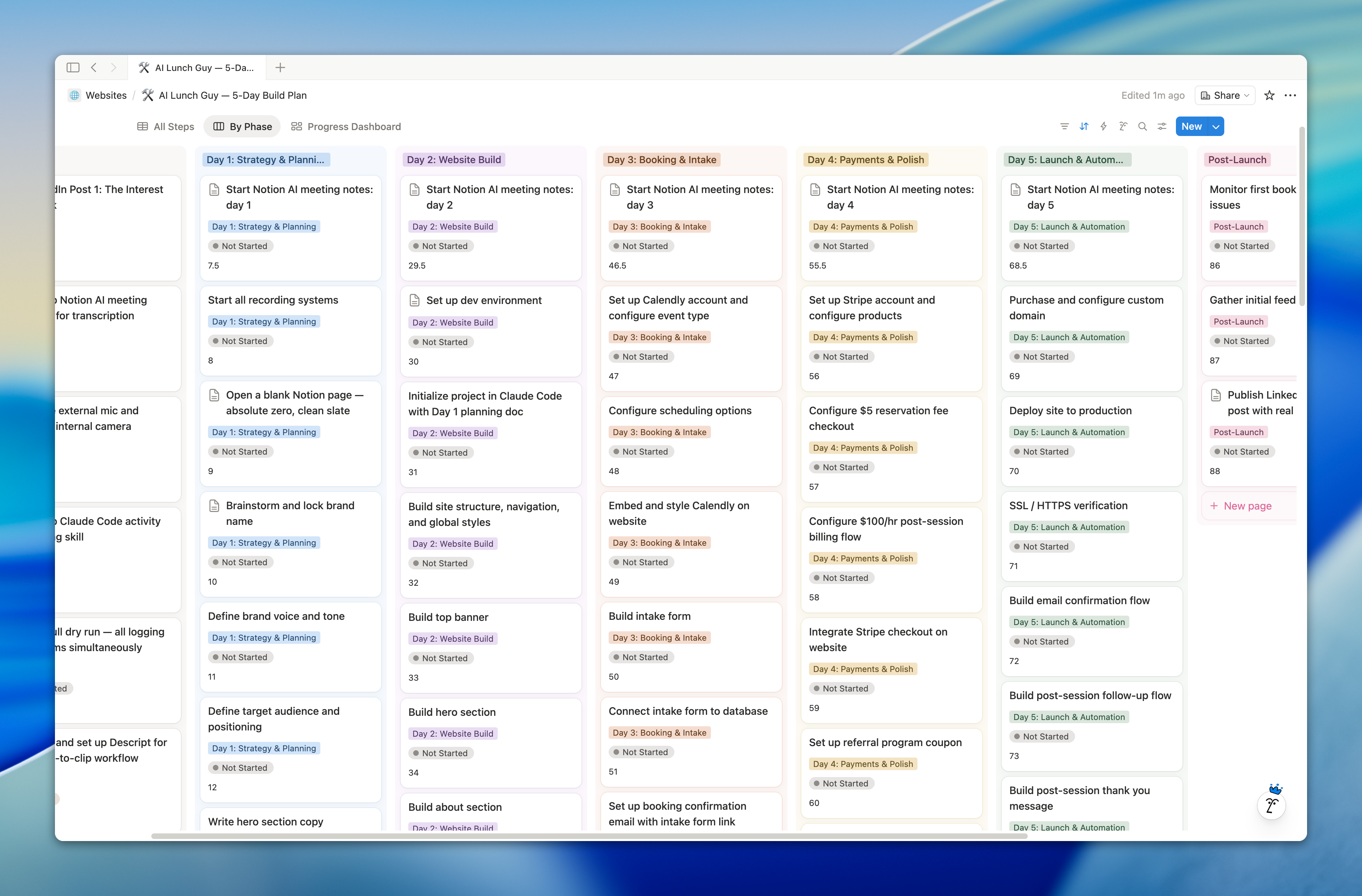
The tools: Claude Code (Opus 4.6), Notion AI, VS Code, Google AI Studio, Wispr Flow, and a bunch of integrations I'll get into. Let's go.
Day 1: Strategy & planning
Tools: Notion AI (Claude Opus 4.6), Wispr Flow
A full day on strategy might sound slow on a 5-day build. But here's what I've learned from building things: the stuff that slows you down on days 3, 4, and 5 is almost always something you skipped on day 1.
Brand voice not locked in? You're rewriting every page of copy. Target audience unclear? Your messaging talks to everyone and lands with nobody. Every shortcut on day 1 becomes a tax on every day after it.
Brand name
Started with "Your AI Lunch Guy" as a working name and pressure-tested it. Fed Notion AI the full context (service description, vibe, positioning, target customer) and asked for honest evaluation plus 15-20 alternatives. We went through 50+ options across seven rounds. Literal names, wordplay names, abstract names, personal brand names.
"Agents with Race" sounded premium but "agents" means nothing to non-technical people yet. "Prompt & Plate" was clever but could read as a food brand. "Bots & Burritos" was memorable (nobody forgets that name) but too niche.
Landed back on the original. "Your AI Lunch Guy" won because it sounds like a nickname, not a brand. "Yeah I have an AI Lunch Guy, you don't?" That casual "I have a guy for that" energy is exactly the vibe. 45 minutes total.
Voice and tone
This step is super important. Everything compounds off the tone decisions you make early. About an hour total, which felt like a lot for "just voice and tone" but every piece of copy I wrote after this went faster because the guardrails were already set.
Defined it across four axes: 90% casual, 70% playful, 80% accessible, 75% conversational. Then six core messaging principles. The big ones: show don't pitch, keep the stakes low, talk like a friend but prove like an operator, and lunch is the differentiator so lean into it.
Built a full "do use / don't use" language guide. Words like "sit down with," "set up," "build together" are in. AI hype language ("supercharge," "unlock," "game-changer") and corporate jargon are permanently out.
Target audience
My first instinct was to lead with "founders and operators." AI pushed back, and I agreed. Leading with that narrows the audience and scares away the exact people who'd get the most value: curious, non-technical professionals who use ChatGPT but haven't touched agents.
We defined 5 segments: the AI-curious professional, the curious founder, the ops operator, the team buyer, and the "my friend told me about you" person. For each one, we mapped who they are, their current AI relationship, their pain point, what success looks like after one lunch, and how they'd find me.
Full website copy
With voice locked and audience defined, the rest moved fast. Wrote each section in a separate conversation, feeding it the brand voice doc and all previous copy so everything stayed consistent.
The hero section went through four versions before landing on: "You figured out ChatGPT. Now what?" That headline works because it meets the reader exactly where they are. Most people have figured out ChatGPT. But "agents" is still vague and intimidating. The headline names that gap without making anyone feel dumb.
Also wrote: about section, how it works (4 steps), use cases (4 audience segments), a comparison table ("Why not just YouTube it?"), FAQ, testimonials (placeholders), bento grid ("What you'll walk away with"), and CTA.
Pricing, booking flow, and intake form
Pricing: $5 reservation fee (filters no-shows) + $200/hr billed after. Simple.
Mapped the entire 11-step customer journey from discovery to post-session follow-up. One fix I caught mid-process: the original flow had the invoice going out before the follow-up email. Swapped them so the customer gets the helpful resource doc first, invoice second.
Drafted 9 intake form questions written in brand voice. "So what do you do all day?" instead of "What is your job title?" The money question: "What's the thing you do every week that makes you go 😩?" That one surfaces the exact pain point I'll build around during the session.
Design direction
Used Wispr Flow's website as brand inspiration. Warm, not cold. Cream and off-white backgrounds instead of sterile white. Two fonts (serif for headings, sans-serif for body). Soft purple for buttons, deep green for contrast, a pop of orange used sparingly. No logo. Rounded everything.
End of Day 1: Brand name locked, voice defined, audience mapped, full website copy written, pricing set, booking flow designed, intake form drafted, design direction chosen. Full business foundation in one day.
Day 2: Website build
Tools: Claude Code (Opus 4.6), VS Code, Playwright MCP, Notion MCP, GitHub, Wispr Flow
The whole point of spending a full day on strategy was so that when I opened Claude Code this morning, I wasn't making decisions. I was executing. Every piece of copy, every section, every design direction was already documented in Notion. Claude Code just needed to read it and build.
Dev environment setup
Created a new project folder, opened it in VS Code, enabled the Claude Code extension, linked Git to a GitHub repo, and turned on two critical MCPs:
- Notion MCP: lets Claude Code read my Notion pages directly. All the copy, brand voice, and design specs from Day 1? Claude Code can pull from them without me copy-pasting anything.
- Playwright MCP: gives Claude Code browser superpowers. It can open the site, take screenshots, and actually see what it built.
15 minutes total. Most of it was just making sure everything was talking to each other.
Wireframe first, design later
Biggest decision of the day. I used Wispr Flow to talk my first prompt into Claude Code: build scaffolding for this website, look at this Notion page (my full copy page), ask clarifying questions before starting. No design. Just wireframe.
Enabled plan mode in Claude Code so it came back with a plan first instead of just writing code. I reviewed the whole plan carefully, went back and forth, and only accepted it once every section was right. Way easier to fix things in plan mode before they're built.
Within 45 minutes of that first prompt, I had a working wireframe of the entire site rendering on localhost. Every section with real copy and full navigation. Ugly as hell, but structurally complete.
Then about 90 minutes of rapid-fire refinements via Wispr Flow: center-justify the banner, make the hero text much bigger, show one tile at a time with pill buttons, stack the How It Works steps vertically and stagger them, make the before/after cards overlap. The whole interaction model was: look at the site, see something off, talk into Wispr Flow, Claude Code updates the code, refresh and look again.
Applying design
Once the wireframe was locked, I pointed Claude Code at the Wispr Flow website for design reference and spent about an hour iterating.
Typography: Fraunces for headings (editorial, confident), Figtree for body (clean, readable). Two fonts, that's it.
Color palette: 7 brand colors with names matching the vibe (lumen, vast, dawn, fathom, glow, pulse). Cream backgrounds, dark/light sections alternating.
Motion: Claude Code installed Framer Motion and built four UI components: ScrollReveal (sections fade in on scroll), AnimatedButton (hover effects), BookingModal (placeholder for Day 3), and Marquee (SF neighborhoods scroller). The before/after cards got spring physics and a mouse-follow tilt effect.
One hiccup: the SF neighborhoods marquee had a jitter. Tiny stutters every few seconds. The browser was recalculating layout mid-animation. Claude Code locked down element sizing and forced it onto the GPU. Came back to this thing multiple times throughout the day.
Mobile pass
Last task: tested on a simulated phone screen and fixed the major layout issues. Headlines too wide, cards overlapping wrong, spacing that felt cramped. Functional, not pixel-perfect yet.
End of Day 2: Empty project folder to a fully designed, interactive marketing site in about 6.5 hours. 14 section components built and styled. Full design system. Framer Motion animations. Interactive cards. Pill-based tabbed interface. Smooth-scrolling marquee. First mobile pass done.
Day 3: Booking & intake
Tools: Claude Code (Opus 4.6), VS Code, Playwright MCP, Notion MCP, Cal.com, Stripe, Vercel CLI, Wispr Flow, GitHub
The goal: go from "looks like a website" to "someone can actually book a lunch and pay for it." Also the hardest day. My daughter woke up at 1am and didn't go back to sleep until 5am. Started the day running on fumes.
Scheduling service
Claude Code compared 8 scheduling services. Cal.com won for one reason: native components. Most scheduling tools give you an embedded window that loads someone else's website inside yours. It looks cheap. Cal.com renders the booking flow as a native part of your site with real animations. The popup opens, animates, and feels like it belongs.
Connected Google Calendar, configured availability, and set up the $5 Stripe reservation fee. Getting the booking modal to look right took about 90 minutes of back and forth. Three iterations: first with a custom wrapper (redundant), then Cal.com's native popup (cleaner), then final polish on colors and styling.
The intake form pivot
The original Day 1 plan: one database where each row tracks the entire customer journey. Booking info, intake questions, session notes, prep plans, billable hours, invoice details. Everything on one line item.
Built it. Looked at it. Way too many properties. One mega-row trying to be both customer-facing intake and internal session tracker was unwieldy.
Fed my concerns to Notion AI and it suggested splitting into two databases: Sessions (internal tracker with status, prep plans, notes, billing) and Intake Responses (customer-facing questions with a relation back to sessions). Way cleaner. Notion AI built it, ran a dummy page through both databases, and then reviewed its own work. Caught stranded properties and redundant fields on its own.
The lesson: don't be afraid to blow up your own plan mid-build. The Day 1 spec said one database. Day 3 reality said two. The spec was a starting point, not a contract.
Going live
Bought yourailunchguy.com through Vercel for $11.25. Installed the Vercel CLI, linked the project, committed everything, and deployed. First production build compiled clean. Updated the favicon, connected the custom domain.
End of Day 3: Site is live. Domain purchased, Stripe payments working, Cal.com booking integrated natively, database architecture restructured, hero and testimonial images added, mobile responsiveness refined. Started at 8:30am, wrapped close to 2:30pm on 3 hours of sleep.
Day 4: Payments & polish
Tools: Claude Code (Opus 4.6), VS Code, Playwright MCP, Notion MCP, Cal.com, Stripe, Zapier, Vercel CLI, Google AI Studio (Nano Banana Pro), Sketch, Wispr Flow, GitHub
Today was about two things: making the site feel like a real product, and building the automated backend.
Hero video
Shot a 30-second talking head earlier in the week with my buddy Morgan from Outer Instinct. Claude Code compared six hosting options. Self-hosted won easily. It's a 30-second clip. Adaptive streaming from YouTube or Mux is total overkill. Compressed the original 4K (27MB) down to 1080p (7.4MB) using ffmpeg. Built a "Hey, watch 🎬" button that opens an animated video popup. The video only loads on click so it doesn't slow down the page.
Automated welcome email
Needed to close the gap between "customer books" and "customer fills out intake form." Cal.com's free tier doesn't support custom email templates. Claude Code researched five options. Zapier's free tier won: 5 emails/day (more than enough for 1:1 consulting), sends from my actual Gmail address, zero code changes.
The full pipeline: site → Cal.com booking → Zapier trigger → Gmail sends welcome email with Notion intake form link.
Custom assets
Google AI Studio using Nano Banana Pro. Feed it an inspiration image, describe what you want, set to 4K. Then: download → open in Sketch → magic wand the background → delete → export as transparent PNG → hand to Claude Code. Built a confused character for the hero section, persona characters for the "Sounds Like You" section, and replaced remaining placeholder images.
The confused character positioning ate 30 minutes. Classic pixel-nudging back and forth with Claude Code using Playwright screenshots. At one point the image looked blurry because the code was shrinking it. Fixed by displaying at actual size.
Notion AI agents
The big one. Started with one agent that was supposed to do everything. About an hour in, it was clear that was too much.
Split into two:
- Create Session & Location agent. Triggered when a new intake form is submitted. Creates a session page, links the intake response, finds the calendar event, looks at the customer's neighborhood, picks a restaurant, and updates the calendar event location.
- Session Prep agent. Triggered when a new session is created. Reads through the full intake form, interprets the customer's pain points, and builds an actionable session prep plan with tool installation checklists, MCP recommendations, and workflow suggestions tailored to that specific person.
Ran a full test with dummy data. Watched the first agent create the session, find a restaurant in Hayes Valley, and update the calendar. The second agent read through every intake response and built a plan that actually made sense. Genuinely cool watching it work autonomously.
One issue: the second agent didn't trigger automatically. Day 5 fix.
End of Day 4: Hero video integrated, welcome email automated, custom assets generated and placed, two Notion AI agents built and tested, real testimonial quotes added. 8:30am to 2:45pm, didn't even eat lunch.
Day 5: Launch & automation
Tools: Claude Code (Opus 4.6), Conductor IDE (briefly), VS Code, Playwright MCP, Notion MCP, Notion AI Agents, Vercel CLI + Analytics, Google AI Studio, Wispr Flow, GitHub
Launch day. Finish the last few site features, build out the full post-session automation workflow, and go live. Most of the day split between two tracks: polishing the site and wiring up the entire customer lifecycle with Notion AI agents.
Conductor IDE detour
Switched from VS Code to Conductor to try its worktree model (isolated branches, multiple localhost instances). The workflow felt different enough that it slowed me down. Day 5 of a 5-day build wasn't the time to rewire muscle memory. Switched back to VS Code.
Build diary dropdown
Claude Code researched six approaches for displaying Notion content on a Next.js site and built a full comparison table. After reviewing the options, I made a call: just link out to the public Notion pages. The diary pages have videos, formatted blocks, tables, callouts. Rebuilding all of that natively would've been a manual effort every time I publish a new day. Linking out means I write the page once in Notion and it's done.
The result: a nav dropdown with each day listed, purple hover states, a triangle pointer, and full mobile responsiveness.
"Send This to Your Boss" section
A section where visitors pick what's eating their time from a dropdown, get a pre-written justification message for their boss, and copy it to clipboard. Two clicks.
Built three completely different prototypes in isolation: a Slack chat bubble mockup with streaming message effect, a typewriter terminal with retro feel, and a pill grid with a folding letter metaphor. All three built and ran on the first pass. Picked the Slack mockup and ran through 8 rounds of refinement.
The multi-prototype approach is something I used twice on Day 5 (here and hero video). Have AI build 3 wildly different versions, pick the best one, iterate. Way better than committing to a single direction and trying to fix it.
Final section: dropdown with 9 options, pre-written templates under 100 words each, a ChatGPT-style typing effect (1-3 words at a time), and a copy button with purple confirmation popup.
SEO and analytics
Did a full SEO and LLM discoverability pass. Eight files created or modified, build passed first try. Sitemap, robots file, overhauled meta tags, structured data covering 5 schema types, and AI-specific discoverability files so LLM-powered search engines (ChatGPT, Perplexity, Claude) can read the site. Includes all 15 SF neighborhoods for local query matching.
The site explicitly allows all AI crawlers. For a service about helping people use AI, showing up in LLM search results is the whole point.
Vercel Analytics: free, two lines of code, no separate login. In and out.
Asset cleanup: inventoried all 83 files, renamed 9, deleted 63. Final count: 18 files.
The 90-minute agent debugging saga
The session prep agent from Day 4 wasn't triggering automatically. Spent about 90 minutes going back and forth with Notion AI trying to debug the trigger. Checked permissions, checked config, re-submitted test data. Nothing.
Turns out: I was using database agents instead of custom agents. Different capabilities, and the trigger behavior I needed only works with custom agents. The actual rebuild took about 15 minutes. The debugging took 90.
Full customer lifecycle
With the agent architecture sorted, built the complete post-session automation workflow.
Custom AI meeting notes: Created a custom instruction guide for session transcripts. When I record a session, the summary pulls out: session overview, tools installed, workflows built, customer Q&A, key moments, and next steps.
Post-session follow-up email agent: Triggers on "Session Complete" status. Reads the intake form, prep plan, session notes, and transcript. Drafts a personalized Gmail email with every tool installed (with URLs), numbered list of workflows with step-by-step instructions, and 2-3 actionable next steps. Also appends the email to the session page.
Post-session thank you agent: Fires about a week later. Drafts a reply to the original follow-up email thread with a casual check-in and two promo codes ($20 off next session, $20 off for a friend). References the specific workflow the customer built to keep it personal.
Session status flow: 7 lifecycle stages from Booked to Fully Wrapped. Invoice tracking lives on a separate property.
Restaurant selection: Built a lookup table mapping each SF neighborhood to a default restaurant. Order at the counter, seat yourself, plenty of seating, relaxed vibe. Hard-coded the selections instead of dynamic picks. Simpler, more reliable, and I know the spots.
Full end-to-end test
Ran the complete pipeline with dummy data. Had Claude Code generate fake intake form submissions and dummy transcripts.
- Claude Code submits dummy intake form
- Intake agent reads the submission, finds the calendar event, selects a restaurant, updates the calendar, creates the session page
- Prep agent triggers automatically, builds a tailored session prep plan
- Added dummy transcript simulating a recorded session
- Set status to "Session Complete"
- Follow-up agent drafts a personalized email with tools, workflows, and next steps, then appends it to the session page
- Thank you agent drafts a reply with check-in and promo codes
All of it worked. The agents read each other's output, built on the context, and produced emails that referenced specific tools and workflows from the session.
End of Day 5: Build diary dropdown, "Send This to Your Boss" section, hero video, full SEO pass, Vercel Analytics, asset cleanup (83 to 18 files), four custom Notion AI agents running the full customer lifecycle, restaurant selection table, end-to-end workflow tested, agent architecture fix (database → custom agents), domain live, site public.
What I built in 5 days
- A fully designed, responsive marketing site on Next.js 16 with TypeScript and Tailwind CSS 4
- Framer Motion animations throughout (scroll reveals, spring physics, hover effects, streaming text)
- Cal.com booking flow with native React components and Stripe payment ($5 reservation)
- Zapier-automated welcome email with Notion intake form link
- Two relational Notion databases (Sessions + Intake Responses) tracking the full customer lifecycle
- Four custom Notion AI agents: intake processing, session prep, follow-up email, thank you email
- Custom AI meeting notes instructions for session transcript summaries
- Restaurant selection system mapped to SF neighborhoods
- Full SEO infrastructure (sitemap, structured data, meta tags, AI crawler discoverability)
- Vercel Analytics and Speed Insights
- Custom-generated assets via Google AI Studio
- A 30-second hero video, self-hosted and compressed
- Interactive "Send This to Your Boss" section with 9 pre-written templates
- Build diary dropdown linking to public Notion pages
- Domain purchased, SSL verified, multiple production deploys
How I actually used AI
Every day had a different mix, but the pattern was the same: give AI full context, let it do what it's good at, make the decisions myself.
Day 1 was Notion AI for content and strategy. Brand name, voice, audience, copy, pricing. AI as a thinking partner.
Day 2 was Claude Code for building. Notion MCP fed it all the planning docs. Playwright MCP let it see what it built. The feedback loop: read context, write code, see result, adjust.
Day 3 split between Claude Code for integrations and Notion AI for database architecture. Parallel workflows: while Claude Code researched scheduling services, I worked on the intake form with Notion AI.
Day 4 added Google AI Studio for asset generation. Three different AI tools for three different problems. Claude Code for frontend, Notion AI for agents, Nano Banana Pro for visuals.
Day 5 was the shift. The Notion AI agents stopped being things I configure and became the actual product running autonomously. Someone books, fills out a form, and by the time I sit down for lunch, I've got a tailored prep plan I didn't write, a restaurant I didn't pick, and a calendar event I didn't update. After the session, the follow-up email drafts itself. A week later, the thank you goes out with referral codes. I just review and hit send.
Five days ago this was a blank Notion page. Now you can book a lunch.